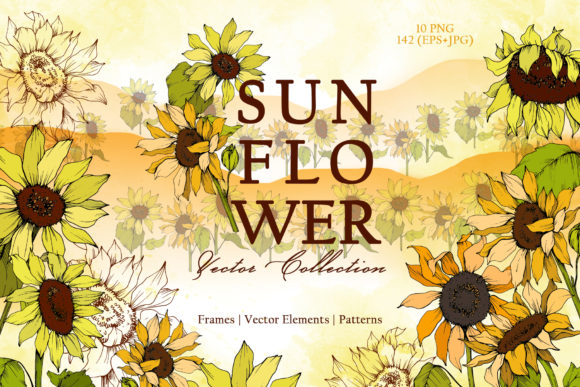
Sunflower Vector Collection for Creative Projects
If you have ever tried to design a wedding invitation, a greeting card, or a simple social media post from scratch, you know how time-consuming it can be. Finding the right artwork, ensuring it is high resolution, and making sure it fits your layout often takes longer than the actual design work. The Sunflower Vector Collection offers a practical shortcut. It is a ready-to-use set of 152 hand-painted sunflower graphics that can be dropped into almost any project without needing advanced design skills or hours of searching for the perfect image.
What the Sunflower Vector Collection Actually Includes
At its core, this collection is a bundle of sunflower-themed illustrations, patterns, frames, borders, and isolated elements. The pack contains 152 files in total, divided into PNG, JPG, and EPS formats. Specifically, you get 10 PNG files at 300 dpi with transparent backgrounds, plus 142 JPG and EPS files that include frames, borders, patterns, and highly detailed isolated illustrations. The patterns and frames are delivered as JPGs at 3500x3500 pixels, which gives you plenty of resolution for printing or digital use. Every image is a separate file, so you can pick exactly what you need without opening a cluttered master file. The graphics are painted by hand in an aquarelle style, meaning they have a soft, watercolor look rather than a stiff, computer-generated appearance.
Why This Collection Appeals to Beginners and Professionals Alike
One of the biggest hurdles for casual creators and small business owners is finding artwork that looks polished but does not require a steep learning curve. This collection solves that problem in a few ways. First, the PNG files have no background, so you can place them directly onto any design without awkward white boxes or messy edges. Second, the EPS files are fully editable, meaning you can change colors, resize elements, and adjust shapes without losing quality. If you are new to design software, you can start with the ready-to-print PNG or JPG files. If you are more experienced, the EPS files give you the freedom to customize every detail. The hand-painted aquarelle style also adds a natural, organic feel that is hard to achieve with standard clipart, which makes your projects look more personal and less generic.
Real Ways to Use the Sunflower Vector Collection
The beauty of this set is that it is not limited to one type of project. Here are some practical examples where these graphics can save you time and improve your results.
DIY Wedding and Event Invitations
Sunflowers are a popular theme for rustic, boho, and autumn weddings. With the frames and borders in this collection, you can create invitation layouts that look custom-made. Place a sunflower border around your text, add an isolated bloom as an accent, and you have a cohesive design in minutes. The 3500x3500 pixel resolution ensures your print will be sharp, even at larger sizes like 5x7 or A5. You can also use the patterns as envelope liners or backdrop elements for welcome signs.
Greeting Cards and Stationery
Whether you are making birthday cards, thank you notes, or just-because mail, the isolated sunflower elements give you flexibility. Drop a single flower onto a blank card front, layer it with a quote, and you have a simple but beautiful design. The transparent PNGs are especially useful here because you can overlap them with text or other graphics without extra cleanup work. If you sell stationery on Etsy or at local markets, having a consistent set of sunflower graphics can help you build a cohesive product line without hiring an illustrator for every new card.
Blog Graphics and Social Media Posts
Bloggers and content creators often need fresh visuals for posts, Pinterest pins, and Instagram stories. The aquarelle elements work well as background textures or subtle overlays. You can use a pattern as a full background for a quote graphic, or place a frame around a featured image. Because the files are high resolution, they also work for YouTube thumbnails or banner designs. If you run a lifestyle or gardening blog, sunflowers are a natural fit, but even business or wellness blogs can benefit from the warm, inviting feel these images bring.
Posters and Printable Art
The large JPG files and editable EPS formats make it easy to create posters for home decor, events, or promotional use. A single sunflower illustration at 300 dpi can be printed at 8x10 or 11x14 without pixelation. You can also combine multiple elements to make a collage-style poster. For entrepreneurs who sell digital products, these graphics can be turned into printable wall art sets. The hand-painted watercolor look is currently very popular in home decor, so this collection aligns well with current design trends.
Quotes and Inspirational Designs
Text-heavy designs like quote posters or social media graphics often need a visual anchor. An isolated sunflower placed beside or behind your text adds warmth without competing for attention. The frames in the collection also work well as borders around quotes, giving the whole piece a finished, framed look. Because you can edit the EPS files, you can adjust the color of the flowers to match your brand palette or the mood of the quote.
What to Keep in Mind Before Using This Collection
While the Sunflower Vector Collection is versatile, there are a few practical points worth considering before you jump in.
File format matters for your workflow. If you primarily use Canva or other browser-based tools, the PNG files with transparent backgrounds will be your easiest option. The EPS files require vector editing software like Adobe Illustrator or Affinity Designer. The JPG files are universal and can be opened in any program, but they do not have transparent backgrounds, so you will need to work with them as layered images rather than standalone cutouts. Think about which software you use most often and start with the format that fits best.
Resolution and print size. The patterns and frames are 3500x3500 pixels at 300 dpi, which is excellent for print. At 300 dpi, that translates to roughly 11.6 x 11.6 inches. If you plan to print larger than that, you may need to scale up carefully or use the EPS files to maintain quality. For digital use, these files are more than sufficient, but you may want to resize them down to keep your project files manageable.
Color editing is possible but has limits. The EPS files are fully editable, so you can change colors to match your brand or project. The PNG and JPG files are raster images, meaning the colors are baked in. If you want to recolor a PNG, you would need to do so in a photo editing program, and the results will depend on the complexity of the image. For maximum flexibility, start with the EPS files if you plan to make color adjustments.
The aquarelle style has a distinct look. Hand-painted watercolor graphics have soft edges and slight variations in color density. This is part of their charm, but it also means they may not look perfectly crisp or uniform like vector flat illustrations. If your project requires sharp, geometric lines, this style may not be the best fit. But if you want a warm, organic, handcrafted feel, the aquarelle elements are ideal.
Who Will Get the Most Value from This Collection
This set is a strong match for a wide range of users. Small business owners who create their own marketing materials will save time and money by having a cohesive set of graphics ready to go. Hobbyists and DIY enthusiasts can produce professional-looking projects without needing to learn complex software. Freelance designers can use the EPS files as a foundation for client work, customizing them to fit specific brand guidelines. Educators and bloggers who need regular visual content will appreciate the variety of frames, borders, and isolated elements that can be mixed and matched quickly. Even if you are completely new to design, the transparent PNGs and high-resolution JPGs give you a low-friction way to start creating right away.
Practical Observations on Workflow and Organization
Because the collection contains 152 separate files, keeping them organized will save you time later. Consider creating folders for each type of element: frames, borders, patterns, and isolated illustrations. This way, when you are in the middle of a project, you can go directly to the folder you need rather than scrolling through a long list. If you use a digital asset management tool or even just a well-named folder structure on your computer, you will get more value from the collection over time. Also, note that the PNG files are 300 dpi with no background, which makes them excellent for layering. You can stack multiple elements, adjust opacity, and experiment with compositions without worrying about background interference.
The Sunflower Vector Collection is not a magic solution that designs everything for you, but it is a practical tool that removes a lot of the busywork. Instead of hunting for individual images that may not match each other, you get a cohesive set of hand-painted graphics that work together naturally. Whether you are putting together a wedding invitation suite, refreshing your blog visuals, or creating sellable printable art, having these files on hand gives you a solid starting point. And because the pack includes editable vectors, high-resolution raster files, and transparent PNGs, you can choose the format that fits your current project and skill level without feeling locked into one workflow.